
Ever had six different families all pick the same 5:00 PM drop-off, and then a crowd at the front desk? You can now cap how many families are allowed to choose the same boarding drop-off or pick-up time on a given day. Set one number and PawsAdmin quietly stops that time from being offered once it's full - so arrivals and pickups spread out on their own. Here's how it works.
Where to find it
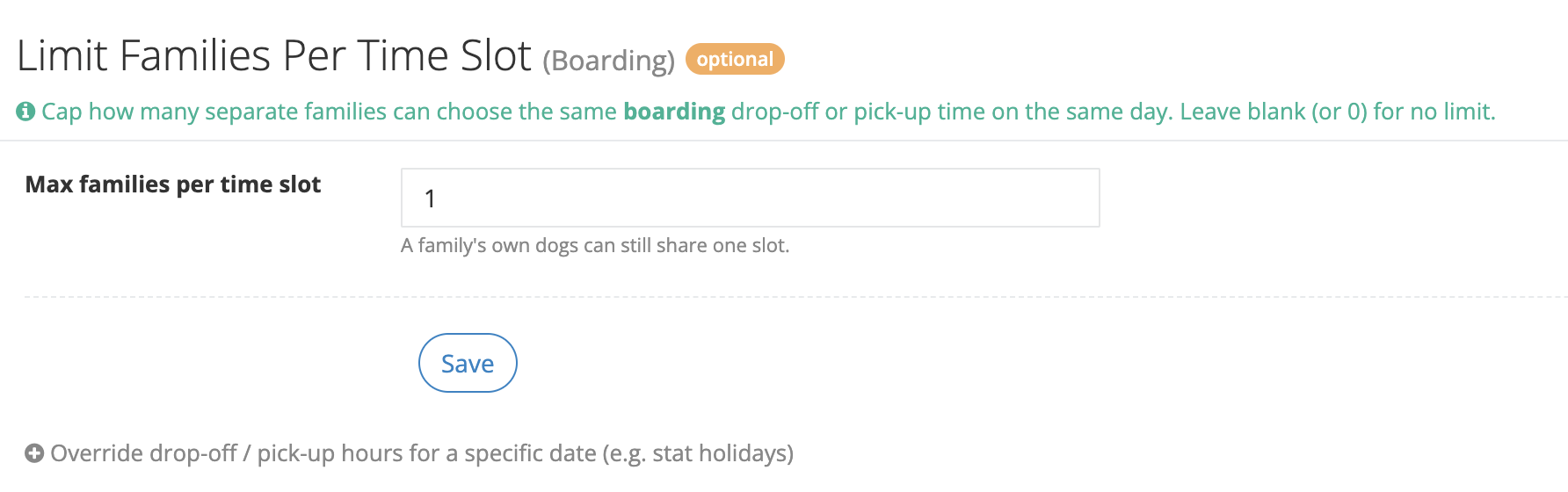
Go to Schedule > General days open. Scroll to the boarding section (the same place you set your drop-off and pick-up hours). Just below the hours you'll see a new card: Limit Families Per Time Slot (Boarding).
1. Set your limit
There's a single box: Max families per time slot. Type the most families you want to allow at any one time, then click Save.
- 1 = one family per time slot. Once a family takes 5:00 PM, no one else can pick 5:00 PM that day.
- 2 = two families per slot, and so on. Pick whatever fits your front desk.
- Blank (or 0) = no limit. This is the default, and nothing changes from how booking works today.
The limit applies to every 15-minute drop-off and pick-up time you offer.
2. How the count works
The limit counts families, not dogs. If one household is boarding three dogs, they all drop off together at, say, 8:00 AM and count as one - so a big family never gets blocked by its own pets. A slot only fills up when that many separate families have chosen it.
What clients see
When a family books boarding online, any time that's already full simply doesn't appear in their drop-off or pick-up menu - no error, no explanation needed, they just pick from what's open. If two people happen to grab the last opening at the same moment, the second one gets a friendly note - "Sorry, that time was just filled. Please choose another time." - and picks again. Everyone still books; they just don't pile onto the same minute.
Good to know
- This applies to boarding only for now. Daycare drop-off and pick-up times aren't capped yet.
- It only affects online booking. You and your team can still book any time from inside PawsAdmin, even a full one, when you need to.
- Changing the number later only affects new bookings - anything already on the calendar stays put.
- A cancelled or declined request frees the slot back up automatically.
Pro tip
Not sure where to start? Try 2. It keeps a steady flow without feeling restrictive to clients, and you can always tighten it to 1 or loosen it later as you see how your days fill.
See also: Set up your boarding drop-off and pick-up hours, and Set up days off and facility closure.
Need help or have questions? Contact our support team at support@pawsadmin.com. We're always here to help you fetch success!