
The quickest way into PawsAdmin is your email and password. If you've forgotten your password, you can reset it with just your email. You don't need to remember your store name or username.
1. Log in with your email
Go to the PawsAdmin login page. Enter the email on your login and your password, then press Log In. The same email and password work on any computer, tablet or phone.
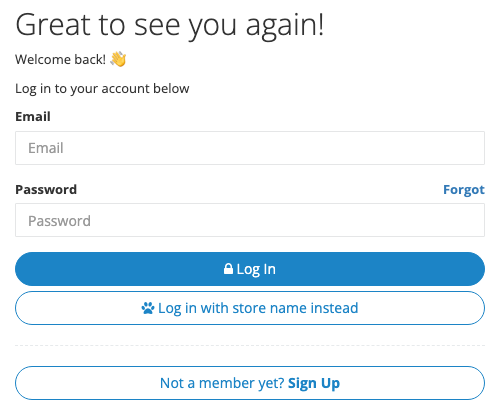
One email on more than one login? Many stores put the owner's email on both the admin login and a shared front desk login, or on logins at two locations. That's fine. Enter the email, and the password you type decides which login opens.
2. Forgot your password?
- On the login page, click Forgot next to Password, or go straight to reset your password.
- Enter your email and press Reset Password.
- Open the email from PawsAdmin and click the reset link. If your email is on more than one login, the email lists each one with its own link. Click the link under the login you want to reset. The other logins keep their passwords.
- Choose a new password and log in with it.
Staff logins can't reset their own password from this page. Ask your store's administrator, who can set a new one in Configure Logins.
3. Prefer your store name and username?
Click Log in with store name instead on the login page, then enter your store name, username (for example, admin) and password.
Forgot your store name or username? Click Remind me, or go to get a reminder, and enter your email. We'll send you every store name and username on that email.
Didn't get the email?
- Check your spam or junk folder. The email comes from hello@pawsadmin.com.
- Add support@pawsadmin.com and hello@pawsadmin.com to your contacts so our emails reach your inbox.
- Make sure it's the email on your PawsAdmin login. If the page says it couldn't find a login with that email, try another address you use, or log in with your store name instead.
Seeing an IP restriction message?
If you see a message like You are not authorized to access this account at this IP address, your login only works from certain internet connections, and you're on a different one.
Your administrator can add, change or remove the allowed IP addresses in Admin > Manage Accounts. Read more about setting up logins.

Still stuck?
- Check that your internet connection is working.
- Try a different browser.
- Clear your browser's cache, or restart your device.
Need help? Create a support request from your account, or email us at support@pawsadmin.com. We're always here to help you fetch success!