
The new dashboard & analytics experiences are open!🎉
- Keeping all your essentials, including check-in, availability, invoice & payments, daily reports, and to-dos and alerts in one central place for easy accessibility
- Here is how you can turn on beta
1. New home dashboard page
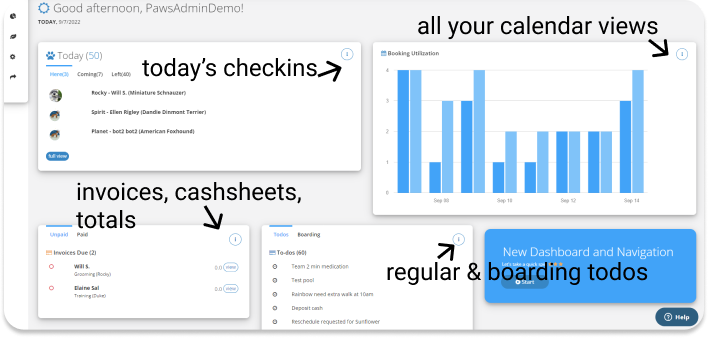
New Dashboard on what's happening today
All of your essential views combined, including check-ins, bookings, invoices, and todos.
2. Left-side navigation
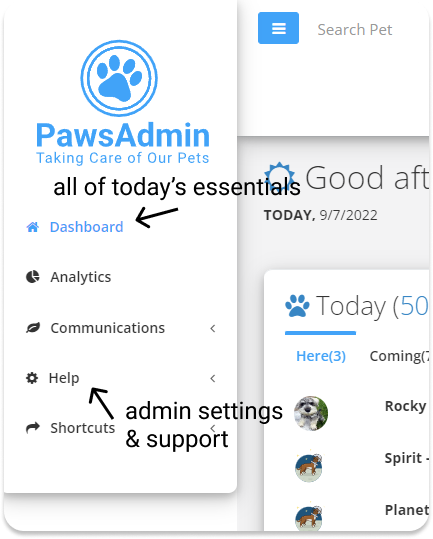
Simplified left-side navigation, including
- Dashboard
- Analytics (Beta coming soon)
- Communications (rover marketing and online booking)
- Help (including admin, knowledge base, tutorials, and support channels)
Changes from the previous navigation:
- Your daily needs can now be found on the dashboard.
- Adding pets and invoices can be found on the top menu.
- Admin settings are combined with the rest of the Help menu
3. Top navigation
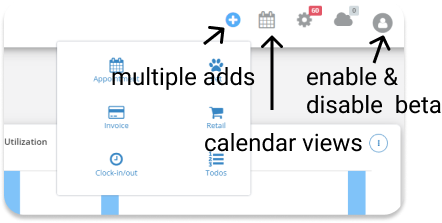
An improved top menu, including
- More shortcuts to quickly add an appointment, pet, invoice, clock-in and out, and more
- Combined calendar view including recurring, daily, weekly, monthly, boarding, and training class
- You can switch between beta and non-beta views in profile
How to turn on the dashboard beta
You can now turn on the beta by clicking on the user icon on the top right corner of any page and 'Try dashboard beta.'
You can switch back anytime by clicking on the user icon.
On the new dashboard, click on the 'Start Tour' and 'Read Me' links which will take you on a tour of the new layout and features.